Our aim was to make workplace communication feel clearer and less stressful while keeping the user in control.
In past internships, I noticed workplace messages are hard to interpret without shared context. Jargon and brief replies leave new employees unsure what a colleague means, or how urgently to respond.
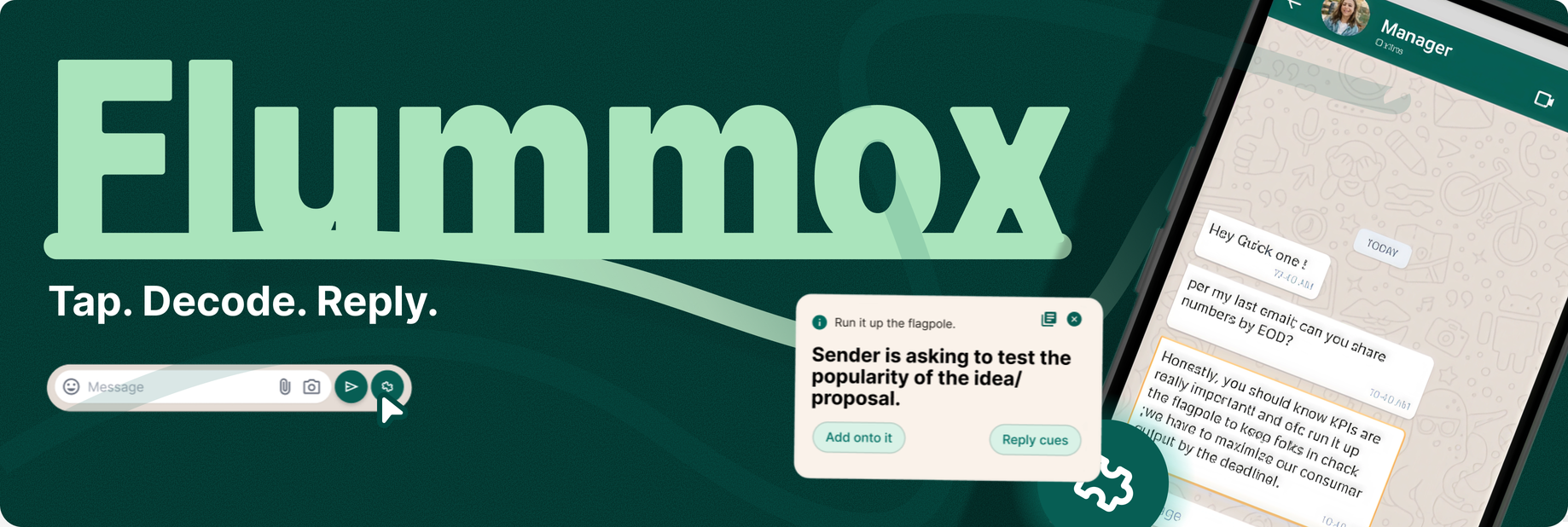
Flummox decodes a confusing phrase on tap: what it likely means, how urgent it is, and a few reply pointers. Everything stays on your device, and the sender never knows.
How might we help early-career employees understand ambiguous workplace messages and respond with more confidence, while respecting their privacy and keeping them in control?
Research narrowed a broad question about digital misunderstandings to one moment: the receiver trying to interpret a message from someone they do not know well.
6/10 already reread and second-guess before sending!
5/10 users agree corporate tone-monitoring isn't just effortful; it's described as exhausting and constant.
8/10 users want to keep the choice to stay "human," even when they know a suggestion might be better.
A full AI rewrite is trusted less than a human's own imperfect wording; this came up independently and unprompted in every second interview!
I am fairly new to the corporate world, and honestly I do not understand the overly formal mails my HR sends.
I observed how opinions fell along a spectrum:
I learnt I wasn't the only one struggling!
– Participant, age 22, from Bangalore.
Looking at the current market, we found many tools that offered full rewrites and paraphrasing, and that were standalone apps.
Here is where Flummox differs.
It is local and editable, and sits within the texting app.
Logo/Icon
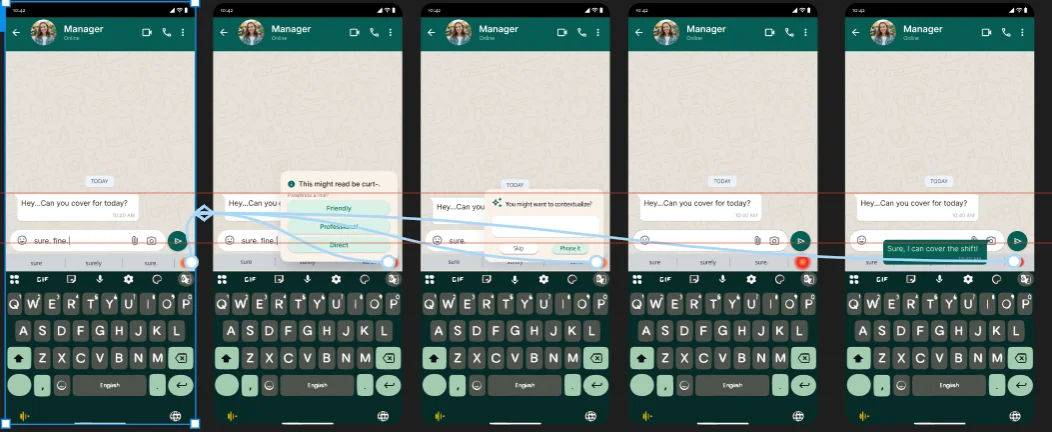
Expected Experience on WhatsApp
It runs on a personal glossary you teach it: meanings are saved per sender and can be changed anytime.
Reply cues give direction, not ready-made sentences, so you keep your voice. Privacy comes first: the sender is never notified and everything is handled on-device.
Flummox is an Android Accessibility Overlay meant for any messaging app. For the prototype, I simulated WhatsApp as a PWA, since a real overlay was outside this term's scope.
Run it up the flagpole.
Medium urgency
You are asked to test the popularity of the idea/proposal.
Add onto itReply cues
Run it up the flagpole.
Medium urgency
You are asked to test the popularity of the idea/proposal.
vote
Add onto itReply cues
Run it up the flagpole.
Add your meaning-
Type your meaning here
SaveReply Cues
Search Word/Phrase
Search any word or phrase…
Type any word to search the whole library. Phrases you save show up here too.
Reply Cues
Suggested
A simple "sure, will do" is enough.
No need to propose a time yet.
Good time to ask any doubts; start with "Can you confirm-"
Add onto it‹ Back
Search Word/Phrase
Run it up the flagpole.+
Library · Medium urgency
You are asked to test the popularity of the idea/proposal.
Reply cues
Meaning card
Vote on a meaning
Add your meaning
Search
Reply cues
Search result
Wireframes
I sketched how Flummox could stay out of the way:
It helps you identify the word or phrase and see an apt response.
It never writes or paraphrases anything for you.
Developing the prototype.
User Flow
Start
01Receive a message
02Click icon to activate
03Select message
Rule-based check runs on-device, no network call
04Add your meaning or Reply cues?
Type your meaning
Save
Go back
05Reply cues
Add your meaning
Click Reply cues
06Search words in library
07Write response with suggested ideas / ways
08Send message
End
I built the first prototype in Figma, then pulled it into Claude Code through MCP to make the working PWA.
What I could prototype
PWA / simulated messaging environment
What I envisioned
Android accessibility overlay / usable over messaging apps
Why a PWA?
A PWA lets two people text each other in a shared room, so I could test the decode-and-reply flow and get real feedback.
It starts with an inbuilt, editable library of the 200 most common jargons and idioms, to help any new joinee settle in.
Design Decisions & Future Scope
Decision
No AI implementation
DecisionBuild a Context Library.
WhyInterviews raised concerns about message privacy and AI replies sounding unlike the user. Flummox supports learning workplace language while keeping users in control of their words.
Trade-offSaved meanings are easy to review and edit, but coverage depends on what the library contains.
Direction
Scalability
NowA standalone PWA for phrase lookup and reply cues.
NextExpand the library, support sender-specific meanings, and explore access from messaging apps.
Future considerationAI could handle more varied messages, but would need further evaluation of context, accuracy, privacy, and cost.
Reflection
I learnt to narrow a broad communication problem into a specific user need. I began with tone and emotional misreading, and research brought the focus to the receiver's doubt about workplace phrases and urgency.